
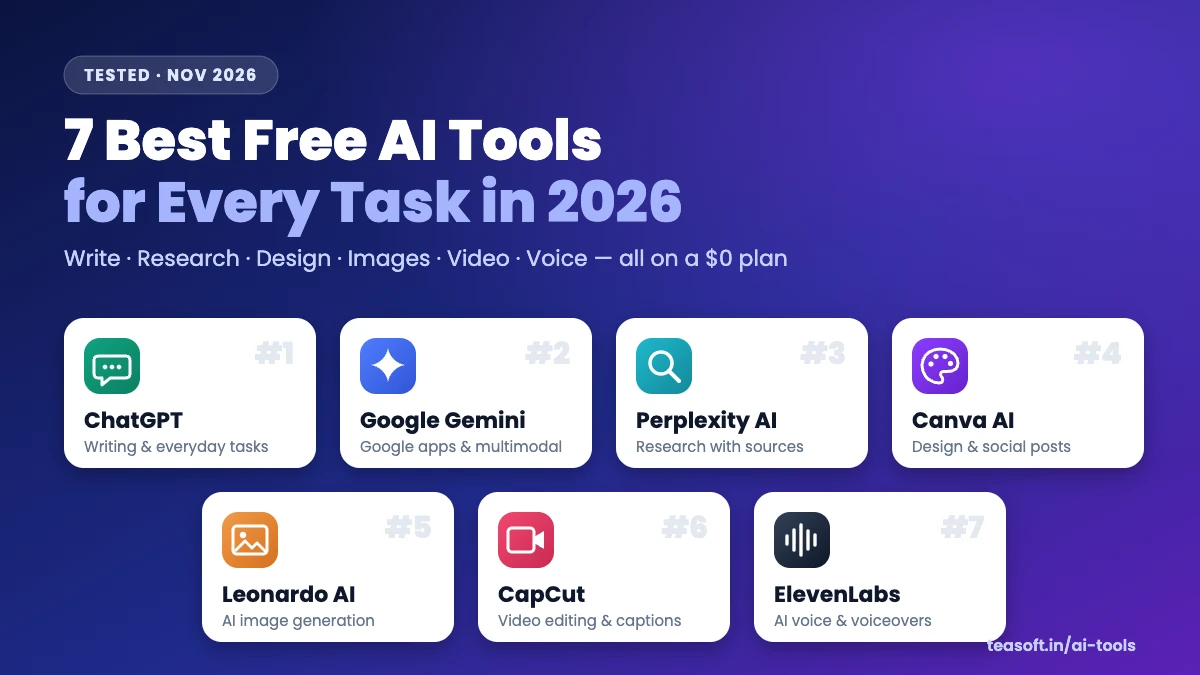
The best free AI tools in 2026 are ChatGPT for writing and everyday questions, Google Gemini for Gmail, Docs and Android users, Perplexity AI for research with sources, Canva AI for design, Leonardo AI for images, CapCut for video and ElevenLabs for AI voice. All seven have a free plan with no credit card needed. Most people only need two or three: one AI chatbot plus one creative tool.
Most “free AI tool” lists are packed with tools that are really free trials. This one isn’t. We used every tool below on its $0 plan and checked what you actually get before you hit a paywall: daily limits, watermarks, commercial-use rules and which features need an upgrade.
Use the table for a fast comparison, the decision chart if you’re not sure where to start, or jump to any tool’s full review in our AI Tools Directory.
Best Free AI Tools Compared (2026)
Here’s how the seven tools stack up on the free plan. Prices are the cheapest paid plan in USD and can vary by country.
| Tool | Best for | What the free plan gives you | Paid from |
|---|---|---|---|
| ChatGPT | Writing, ideas, coding, everyday help | Smart model with message limits, web search, file uploads, voice | ~$8/mo (Go) |
| Google Gemini | Google apps, Android, multimodal | Free Gemini app, image tools, limited Deep Research | $7.99/mo |
| Perplexity AI | Research and fact-checking | Unlimited quick searches with sources, a few Pro searches a day | $16.67/mo (yearly) |
| Canva AI | Social posts, slides, posters | Templates, basic AI tools, about 50 AI credits a month | ~$15–18/mo |
| Leonardo AI | AI art and product images | 150 tokens a day, basic models, public generations | $10/mo (yearly) |
| CapCut | Reels, Shorts, YouTube edits | Full editor, auto captions, templates, limited AI features | ~$15/mo (yearly) |
| ElevenLabs | Voiceovers and narration | About 10,000 credits a month (roughly 10 minutes of speech) | $6/mo |
Want two tools side by side? Use our free Compare AI Tools feature to see features, pricing and free limits in one view.
How We Picked the Best Free AI Tools
Every tool on this list had to pass four simple tests:
- Really free: a forever-free plan, not a 7-day trial, and no credit card to sign up.
- Useful on day one: the free plan has to do the core job well, not just show you a demo.
- Fair limits: enough daily or monthly usage for a student, freelancer or small business.
- Best in its task: we picked one winner per job, so you don’t need ten tools that do the same thing.
We re-check free plans and prices every month. Last updated: November 2026.
1. ChatGPT: Best Free AI Assistant for Writing and Everyday Tasks
ChatGPT from OpenAI is still the most useful all-round free AI tool. It writes and edits text, explains topics in plain language, helps with code, reads PDFs and images, searches the web and talks with you in voice mode, all in one chat.
What you get free: access to OpenAI’s flagship model with a usage cap (after that it switches to a lighter model until the limit resets), web search, file and image uploads, limited image generation, voice chat and a small number of deep research runs. Upgrading to Go or Plus mainly raises those limits.
- Handles almost any text task well
- Web search, file uploads and voice on the free plan
- Apps for web, iOS, Android, Windows and Mac
- Hits the top-model cap fast on busy days
- Image and deep research limits are tight
- Can sound generic without a clear prompt
2. Google Gemini: Best Free AI for Google Apps and Android
Google Gemini is Google’s AI assistant, and its biggest advantage is where it lives. It can pull from your Gmail, Docs, Drive, Maps and YouTube, it’s built into Android and Chrome, and it handles text, images, files and voice in one place.
What you get free: the Gemini app on web and mobile with Google’s fast model, limited access to its most capable model, image creation and editing, Gemini Live voice chat, connections to Google apps and a limited number of Deep Research reports. Google AI plans add higher limits, more storage and Gemini inside Workspace apps.
- Works directly with Gmail, Docs, Drive and YouTube
- Strong with images, PDFs and long documents
- Generous free plan for a Google account
- Best features need you to live in Google’s apps
- Top model has stricter free limits
- Answers can be less detailed than ChatGPT for writing
3. Perplexity AI: Best Free AI for Research with Sources
Perplexity AI is an AI answer engine. Instead of ten blue links, it searches the web in real time and writes a clear answer with numbered sources you can click and check. That makes it the safest free AI for anything where facts matter: homework, news, product research or checking a claim before you share it.
What you get free: unlimited quick searches with citations, a small number of advanced Pro searches each day, file uploads and follow-up questions. Pro adds many more advanced searches and a choice of top AI models.
- Every answer shows its sources
- Fast, up-to-date information from the web
- Great for students and researchers
- Weaker than ChatGPT for long creative writing
- Advanced searches are limited on free
- Source quality varies, so still check key facts
4. Canva AI: Best Free AI Tool for Design
Canva AI turns Canva’s huge template library into a design assistant. Describe what you need and it drafts a layout, writes copy, generates images and resizes the design for every platform. If you don’t have design skills, it’s the quickest way to make something that looks professional.
What you get free: thousands of templates, the core editor, basic AI tools such as AI writing and text-to-image, and a monthly allowance of around 50 AI credits. Canva Pro unlocks the full Magic Studio, background remover, Brand Kit and premium stock.
- Easiest design tool for beginners
- Templates for every social platform
- Works on web, desktop and mobile
- Many premium elements are Pro-only
- AI credits run out quickly
- Background remover is a paid feature
5. Leonardo AI: Best Free AI Image Generator
Leonardo AI gives you studio-level control over AI images for free. You can pick a style model, set the aspect ratio, upload a reference image and upscale results, which makes it more flexible than the image tools inside chatbots.
What you get free: 150 tokens a day (enough for a good batch of images), access to the basic models and core tools. Free images are public in the community feed. Paid plans add private generations, faster speeds and many more tokens.
- Daily tokens refresh, so it’s free forever
- Lots of styles and fine control
- Good for consistent characters and products
- Free images are public
- Best models cost more tokens
- Takes a little practice to master
6. CapCut: Best Free AI Video Editor
CapCut is the go-to free video editor for short-form creators. Its AI features do the boring work for you: automatic captions, background removal, beat sync, templates and one-click resizing for vertical video.
What you get free: the full timeline editor on web, desktop and mobile, auto captions, free templates, music and effects, plus a limited set of AI features. CapCut Pro unlocks premium effects and assets, more AI credits and extra cloud storage.
- Auto captions are fast and accurate
- Perfect for vertical, short-form video
- Free on every device
- Some effects and templates are Pro-only
- AI features are limited on free
- Check Pro assets before export to avoid surprises
7. ElevenLabs: Best Free AI Voice Generator
ElevenLabs makes the most natural-sounding AI voices available today. Type a script, pick a voice and you get a voiceover with real emotion and pacing, in dozens of languages.
What you get free: about 10,000 credits a month, which is roughly 10 minutes of speech, access to the voice library and text-to-speech. The free plan has no commercial licence and needs attribution, so upgrade to Starter if you’ll publish or monetise the audio.
- Most realistic AI voices we tested
- Many languages and accents
- Simple: paste text, pick a voice, download
- Only about 10 minutes of audio a month
- No commercial use on the free plan
- Voice cloning needs a paid plan
Head-to-Head: Popular Free AI Tool Comparisons
Stuck between two tools? These are the comparisons our readers ask about most. Each one opens side by side in our Compare AI Tools feature, with features, pricing and free plan limits.
Which Free AI Tool Should You Use?
The quickest way to choose is to start with the job, not the tool. Find your task below and use the matching pick.
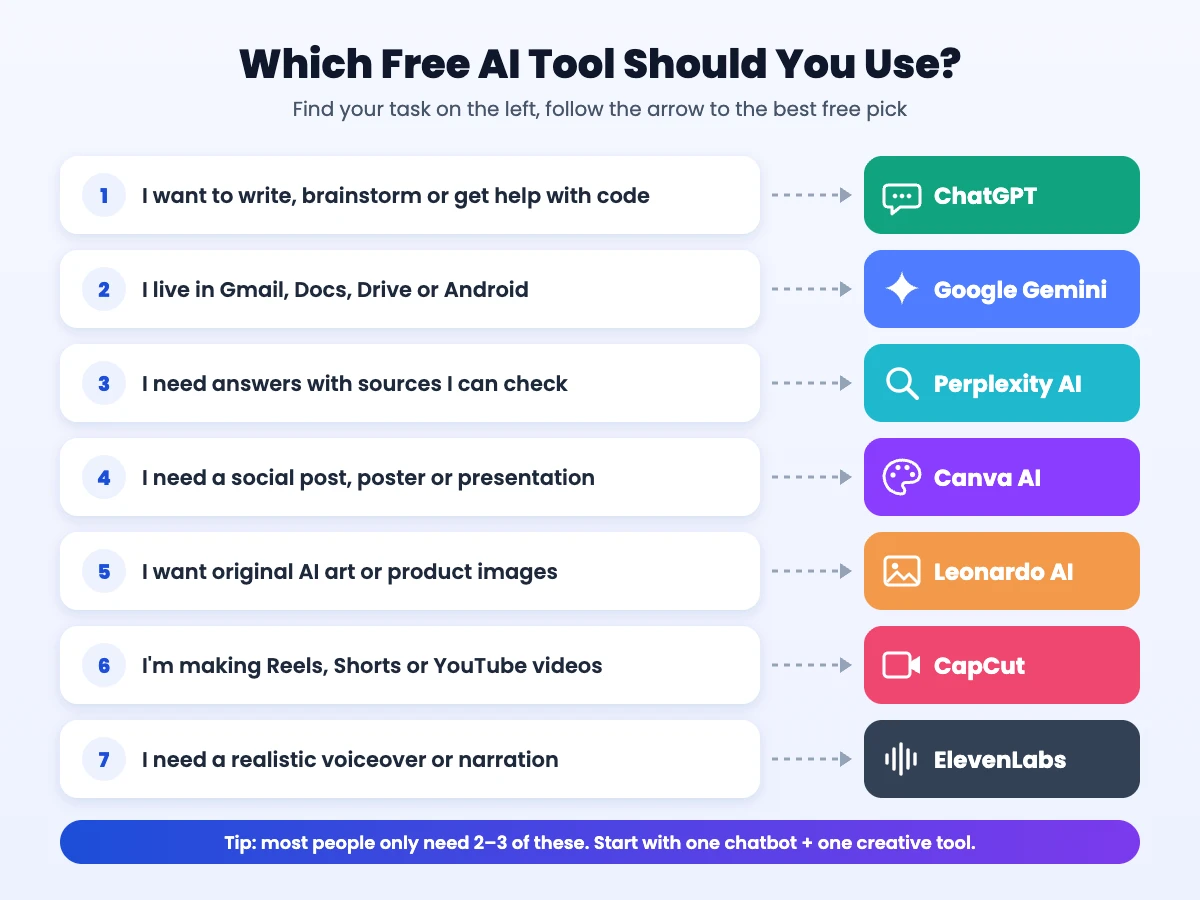
- Students: Perplexity for research with sources, ChatGPT or Gemini to explain topics and plan essays.
- Content creators: ChatGPT for scripts, CapCut for editing and captions, ElevenLabs for voiceovers.
- Small businesses: Canva AI for social posts, ChatGPT for emails and product copy, Gemini if your team runs on Google Workspace.
- Designers and marketers: Leonardo AI for original images, Canva AI to turn them into finished designs.
Build a $0 AI Workflow: From Idea to Finished Video
These tools are even better together. Here’s a simple workflow we use to make a short video without paying for anything:
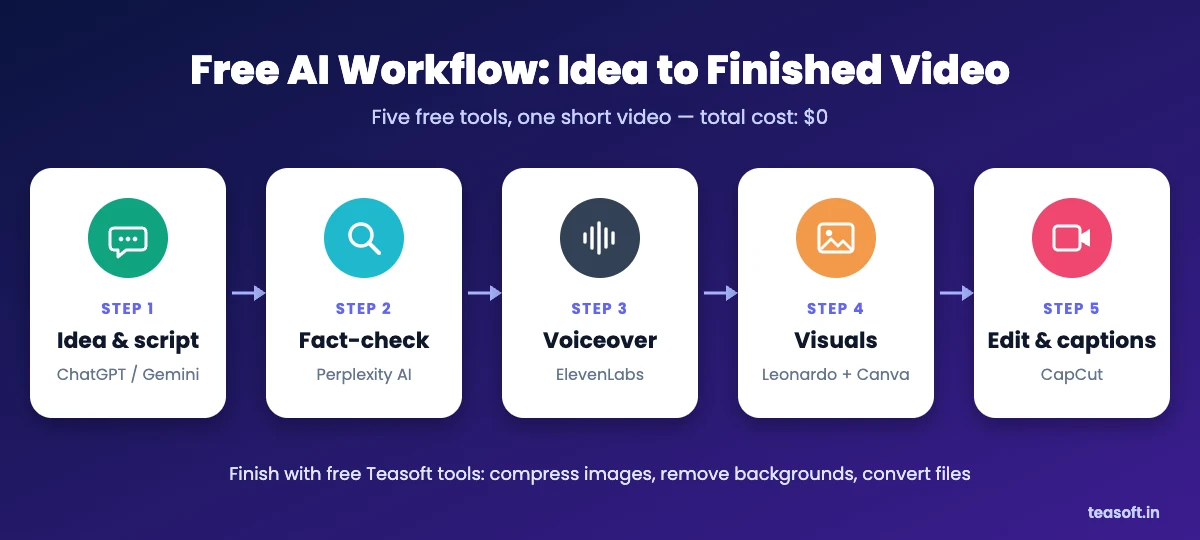
- Write the script with ChatGPT or Gemini. Ask for a 45-second script with a hook in the first line and a clear call to action.
- Fact-check it with Perplexity. Paste any stats or claims and confirm them against real sources.
- Record the voiceover with ElevenLabs. A 45-second script uses only a small part of your monthly free credits.
- Create visuals with Leonardo AI and Canva. Generate images in Leonardo, then add text and branding in Canva. Keep files light with our free image resizer and image compressor.
- Edit and caption in CapCut. Drop in the voiceover and visuals, add auto captions and export in 9:16 for Reels, Shorts or TikTok.
More Free AI Tools Worth Trying
These didn’t make the top seven, but each has a useful free plan for a specific job:
- Claude: a thoughtful ChatGPT alternative that’s great with long documents and careful writing.
- DeepSeek: a free chatbot with strong reasoning and coding skills.
- Grammarly: free grammar, spelling and tone fixes wherever you type.
- Notion AI: AI writing and summaries inside your notes and docs.
- Gamma: turns a prompt or outline into a polished presentation.
- Otter.ai: free meeting transcripts and summaries.
- Descript: edit audio and video by editing the transcript.
- Suno: create songs and background music from a text prompt.
See every tool, filtered by task and price, in the Teasoft AI Tools Directory.
Free AI Plan Limits: What to Watch Out For
“Free” almost always comes with conditions. Check these before you rely on a tool for real work:
- Usage caps: chatbots limit their best model; image and voice tools use daily or monthly credits.
- Commercial use: some free plans, including ElevenLabs, don’t allow commercial use. Read the licence before you monetise anything.
- Public content: free images on some generators, like Leonardo AI, are visible to other users.
- Privacy: don’t paste passwords, client data or personal ID numbers into any AI tool. Check whether you can turn off training on your chats in the settings.
- Accuracy: AI can be confidently wrong. Double-check facts, numbers and quotes, ideally with a tool that shows sources.

Frequently Asked Questions
What is the best free AI tool in 2026?
ChatGPT is the best all-round free AI tool in 2026 because it handles writing, questions, coding, files and voice in one app. For specific tasks, Perplexity AI is best for research, Canva AI for design, Leonardo AI for images, CapCut for video and ElevenLabs for voice.
Is ChatGPT still free in 2026?
Yes. ChatGPT has a free plan that includes OpenAI’s flagship model with usage limits, web search, file uploads and voice chat. Paid plans such as Go and Plus mainly raise those limits.
Which is better for free users, ChatGPT or Google Gemini?
ChatGPT is the better all-rounder for writing and general tasks. Google Gemini is better if you use Gmail, Docs, Drive or an Android phone, because it can work directly with those apps. Both are free to start.
What is the best free AI tool for students?
Perplexity AI is the best free AI tool for students because every answer includes sources you can check. Pair it with ChatGPT or Gemini to explain difficult topics and plan essays.
What is the best free AI image generator?
Leonardo AI is the best free AI image generator for most people. Its free plan gives you 150 tokens a day, many styles and fine control. Canva AI is easier if you want images inside a finished design.
Can I use free AI tools for commercial work?
Sometimes. ChatGPT, Gemini and Canva generally let you use what you create, but some free plans, such as ElevenLabs, do not include a commercial licence. Always check each tool’s terms before you sell or monetise the output.
Are free AI tools safe to use?
The tools on this list are from established companies and are safe for everyday use. Avoid sharing passwords, financial details or private client data, and check the privacy settings to control whether your chats are used for training.
Do free AI tools have daily limits?
Yes. Most free AI tools limit usage: chatbots cap access to their best model, Leonardo AI gives 150 tokens a day, Canva AI gives a monthly credit allowance and ElevenLabs gives about 10,000 credits a month.
Final Verdict: The Best Free AI Tools to Start With
If you only try one tool, make it ChatGPT. If you use Google apps every day, start with Gemini instead. Then add one tool for your main creative job: Canva AI for design, Leonardo AI for images, CapCut for video or ElevenLabs for voice. Keep Perplexity open for anything where the facts matter.
All seven are free to start, so the best way to choose is to try two or three on a real task this week.
Find the right AI tool in minutes
Browse hands-on reviews of hundreds of AI tools, filter by task and price, and compare any two side by side.

Amandeep Bindra is the Founder of AdBindra Corporation, the parent company of Teasoft. With over a decade in web development, AI and digital marketing, he shares practical, tested insights on AI tools, web technology and productivity.