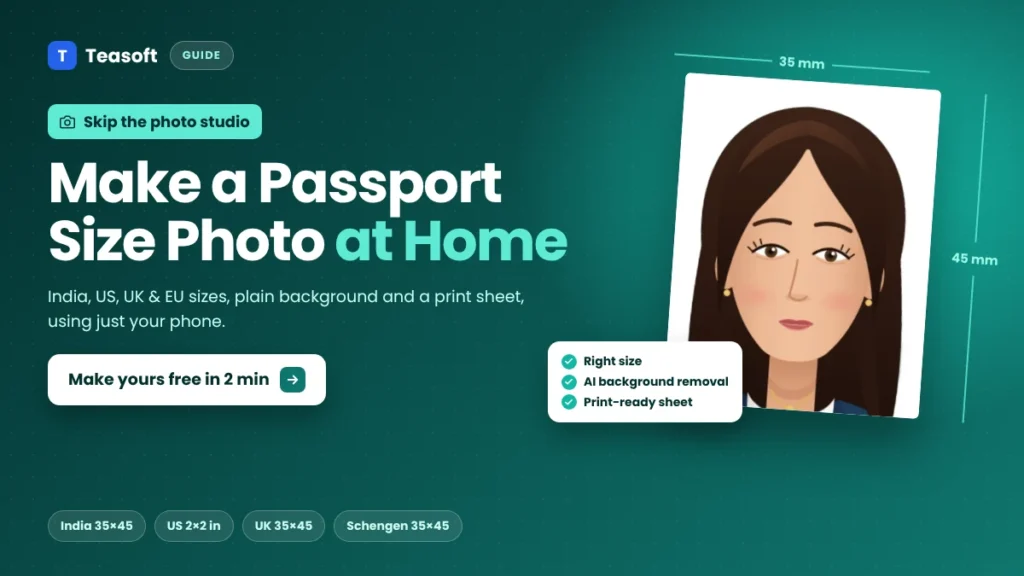
To make a passport size photo at home, take a clear, front-facing photo against a plain light wall in daylight. Then open a free passport size photo maker, pick your size (India passport is 35 × 45 mm, US is 2 × 2 inches) and let it size and centre your head and replace the background automatically. Then download a single photo for online forms or a 4×6 sheet to print. Always check the official rules for your application before you submit.
Need a passport size photo for a passport, visa, exam form or job application? You don’t have to visit a photo studio. With a phone, a plain wall and a free online tool, you can make a correctly sized passport size photo at home in about five minutes.
In this guide you’ll find the exact passport photo sizes for India, the US, the UK and Schengen countries, tips for taking a good photo, and a step-by-step walkthrough using Teasoft’s free Passport Size Photo Maker, with real screenshots.
Passport Size Photo Sizes by Country
The right passport size photo depends on the country and the type of application. Here are the most common sizes:

| Document | Photo size | Key rules |
|---|---|---|
| India passport | 35 × 45 mm (3.5 × 4.5 cm) | Colour photo, plain white background, full face. At a Passport Seva Kendra your photo is usually taken on the spot, but printed photos are needed for some forms. |
| India visa / OCI | 51 × 51 mm (2 × 2 in) | Square photo with a plain light or white background. Online uploads have their own pixel and KB limits. |
| US passport / visa | 51 × 51 mm (2 × 2 in) | Head 1 to 1⅜ in (25–35 mm) from chin to top of head, white or off-white background, no glasses, taken within the last 6 months. |
| UK passport | 35 × 45 mm | Head 29–34 mm, plain cream or light grey background, neutral expression with mouth closed. |
| Schengen / EU visa | 35 × 45 mm | Face 32–36 mm (about 70–80% of the photo), plain light background, taken within the last few months. |
What You Need to Make a Passport Size Photo at Home
- A phone camera. Any modern smartphone is good enough.
- A plain wall if you can. The tool’s AI background remover handles most backgrounds, but a plain, light wall gives the cleanest edges around your hair.
- Even daylight, ideally facing a window, so there are no harsh shadows.
- Someone to take the photo at eye level. Selfies are often slightly distorted.
- A free passport size photo maker to crop, resize and set the background.
How to Take a Good Passport Photo at Home
A tool can crop and resize your photo, but it can’t fix blur or bad lighting. Get these right first:
- Stand about 50 cm in front of a plain wall so your shadow doesn’t fall on it.
- Face the light. Stand facing a window in daylight. Avoid overhead lights that cast shadows under your eyes.
- Ask someone to shoot from about 1–1.5 metres away, with the phone held at your eye level and in portrait mode.
- Look straight at the camera with a neutral expression, mouth closed and both eyes open.
- Keep your face clear. Pull hair away from your eyes and remove glasses unless your application allows them.
- Wear plain, darker clothes that stand out from a light background. Avoid white tops on a white wall.
- Don’t use filters, beauty mode or editing apps. Official photos must look like you.
How to Make a Passport Size Photo at Home: Step by Step
Here’s how to turn your phone photo into a passport size photo with Teasoft’s free tool. It works on mobile and desktop, there’s no sign-up or watermark, and your photo is edited in your browser and never uploaded to a server. Built-in AI finds your face, sizes it to your country’s rules, straightens a tilted head and removes the background for you.
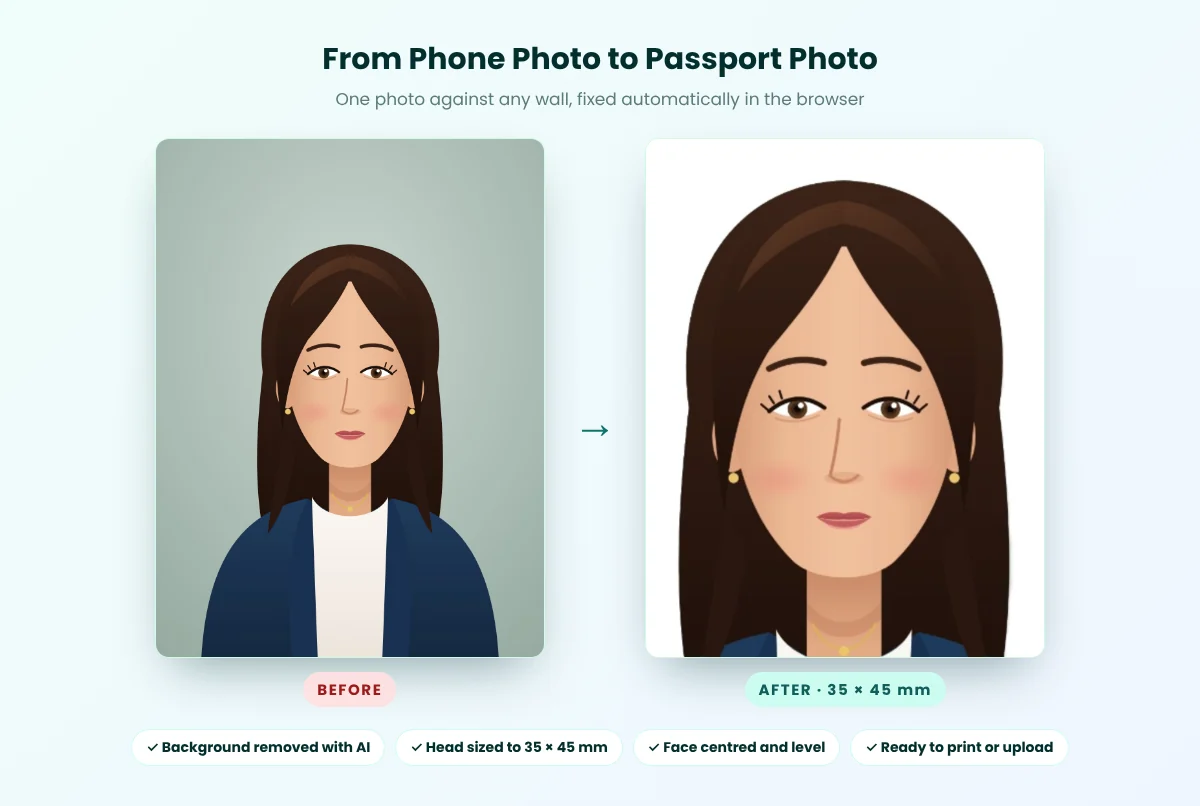
Step 1: Open the tool and add your photo
Open the Passport Size Photo Maker. Tap Choose, drag your photo onto the box, or paste it with Ctrl+V. It accepts JPG, PNG, WebP and other common formats. If your photo is an iPhone HEIC file, convert it first with our HEIC to JPG converter.
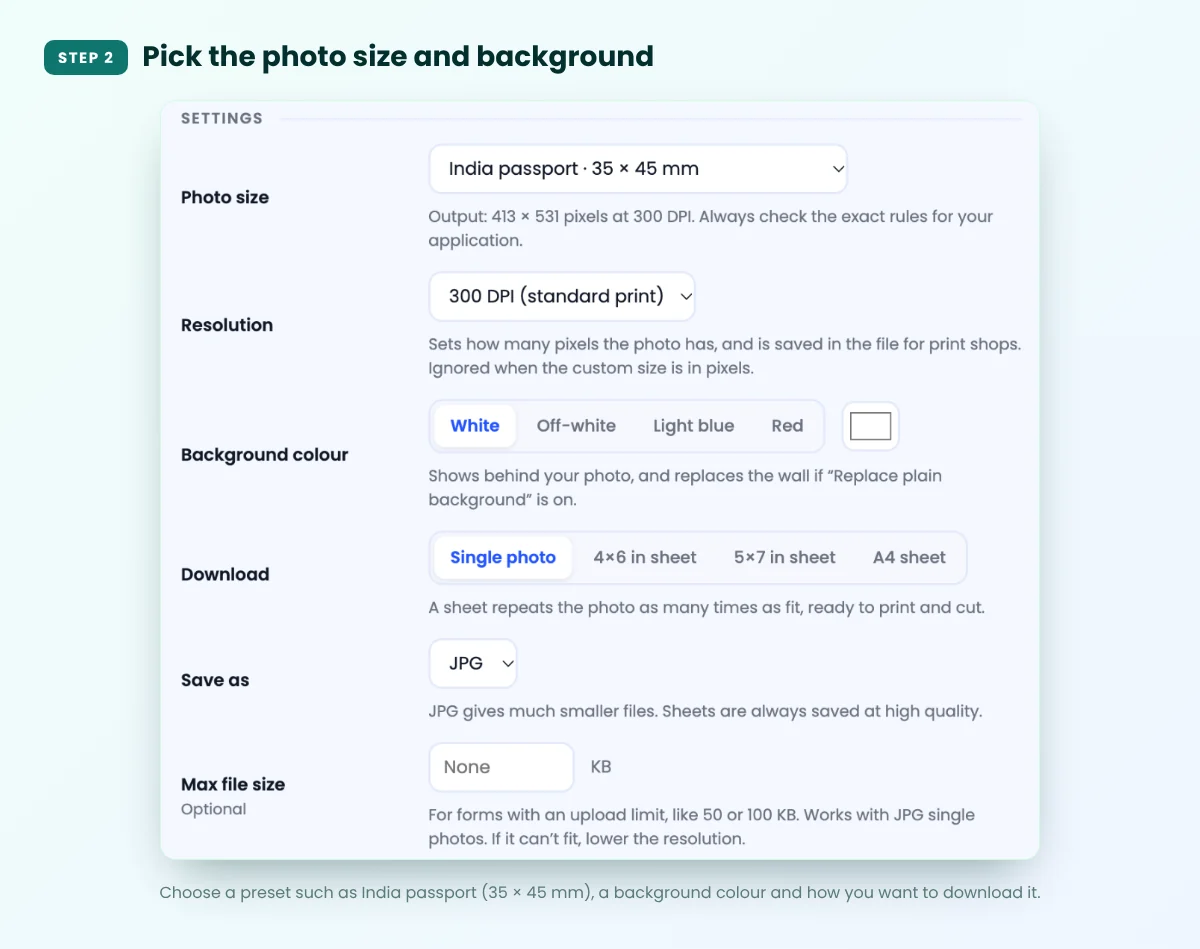
Step 2: Pick the photo size and background
In Settings, choose your size from the presets, such as India passport · 35 × 45 mm, India visa / OCI, PAN card, USA passport / visa, UK passport or Schengen / EU. You can also enter a custom size in mm or pixels. Then pick a background colour: White, Off-white, Light blue or Red.
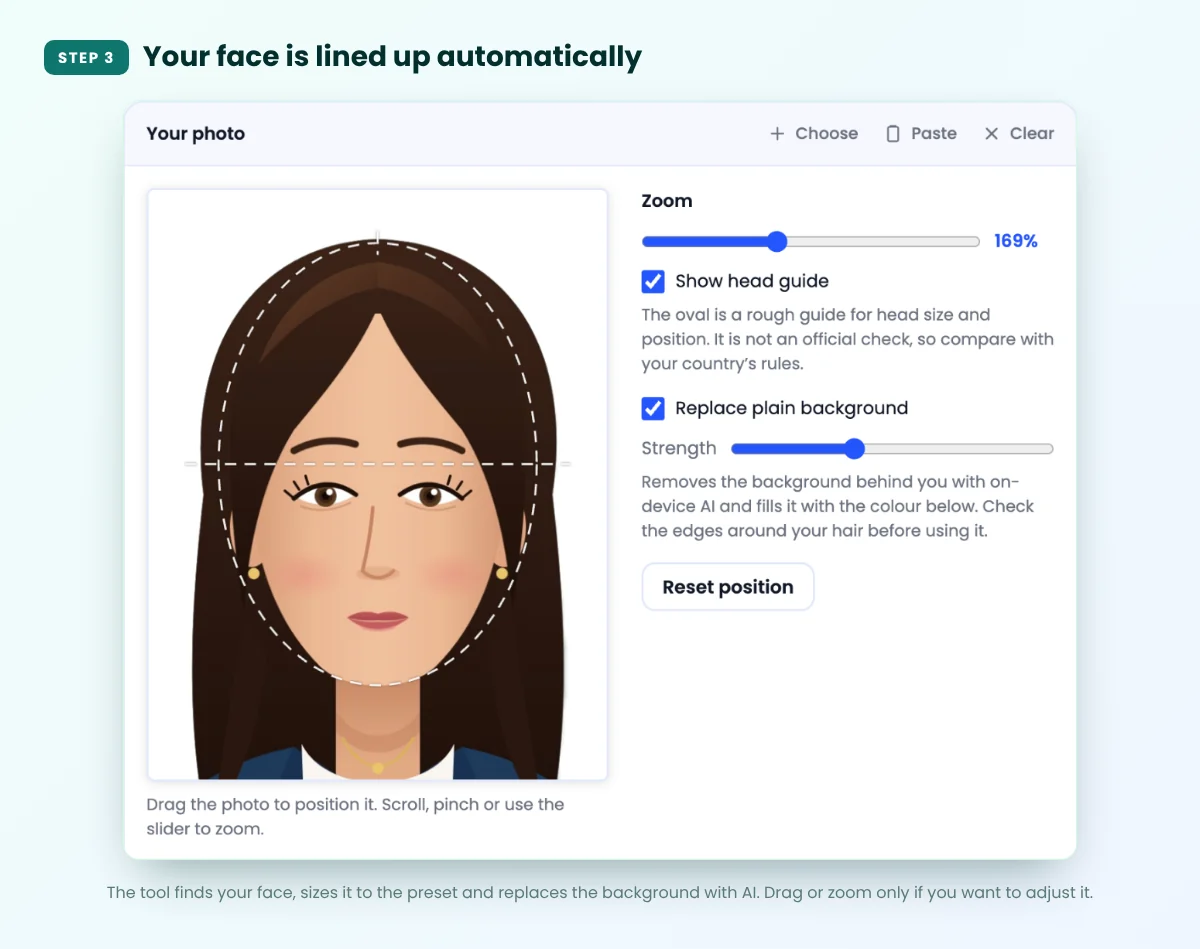
Step 3: Check the automatic alignment
A few seconds after you add your photo, the tool finds your face and lines it up for you: it sizes your head to the preset’s rules, centres it, straightens it if it’s tilted and fits it inside the oval guide. Tick Replace plain background to swap your wall for a clean colour with AI, then check the edges around your hair. If you want to adjust anything, drag the photo or use the zoom slider, and press Reset position to go back to the automatic fit.
The tool also shows a message if something might get your photo rejected, such as closed eyes, an open mouth, a turned head or a photo that’s cropped too close to the top of your head.
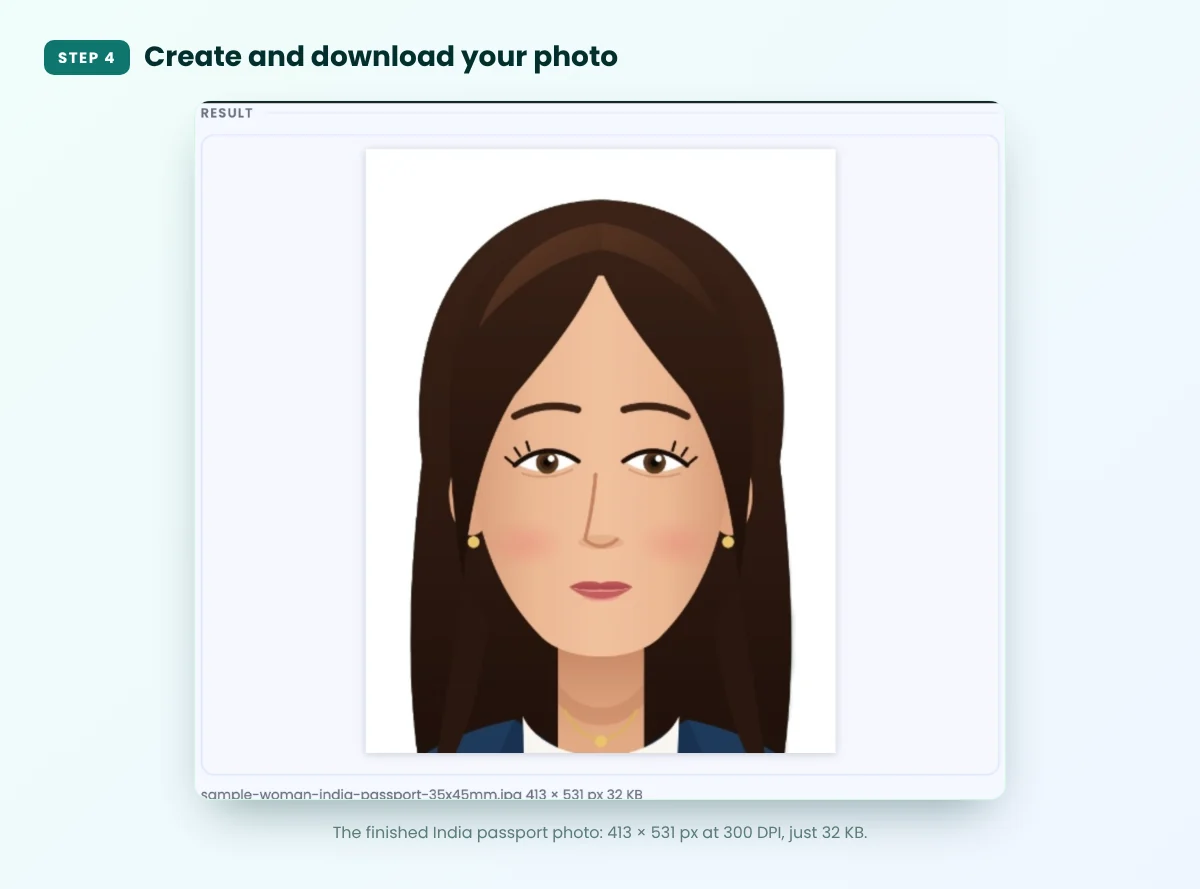
Step 4: Create and download your passport size photo
For an online application, keep Single photo selected and save as JPG. Click Create passport photo, check the result, then click Download. At 300 DPI, an India passport photo comes out at 413 × 531 pixels.
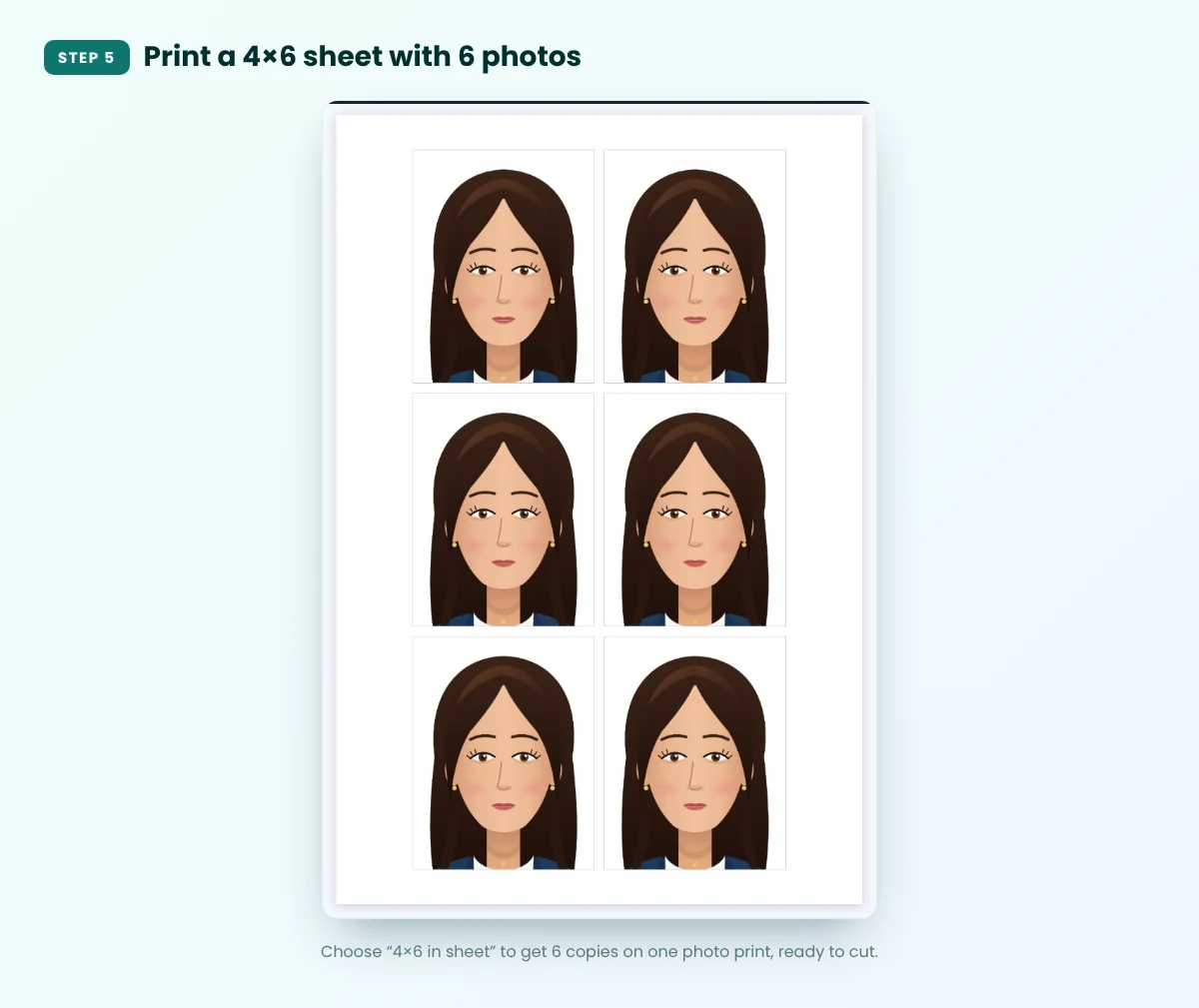
Step 5: Make a print sheet (optional)
Need printed copies? Choose 4×6 in sheet, 5×7 in sheet or A4 sheet and click Create passport photo again. The tool repeats your photo as many times as fit. A 4×6 sheet holds 6 India passport photos, and a 4×6 print at a photo shop usually costs much less than a studio session.
How to Print Your Passport Photos
- Print at 100% or “actual size”. Turn off “fit to page” or “scale to fit”, or your photos will come out the wrong size.
- Use a photo lab or kiosk for the 4×6 sheet. Ask them to print it as a standard 4×6 photo without cropping.
- Printing at home? Use the A4 sheet on glossy photo paper with the printer’s best quality setting.
- Measure one photo with a ruler before cutting the rest, then cut neatly along the edges.
How to Get Your Photo Under 50 KB or 100 KB for Online Forms
Many Indian exam, job and government portals limit photo uploads to a small file size, often 20–50 KB or up to 100 KB, and sometimes a fixed pixel size. The exact limit varies, so check your form’s instructions.
- In the passport photo maker, type your limit into Max file size (for example 50 KB). It works for JPG single photos.
- If it can’t fit, change Resolution to 200 DPI and create the photo again.
- Already have a finished photo? Use Compress Image to 50KB, Compress Image to 100KB or Compress Image to 20KB for signatures.
- Need exact pixel dimensions? Use the Image Resizer.
Common Mistakes That Get Passport Photos Rejected
- Wrong size or head too small. The face must fill most of the photo, not just sit in the middle.
- Shadows on the face or behind the head from overhead lights or a flash.
- Busy or coloured background when the rules ask for plain white or light grey.
- Glasses with glare, tinted lenses or frames covering the eyes.
- Smiling with teeth, tilted head or not looking straight at the camera.
- Filters, beauty mode or heavy editing that change how you look.
- Old photos. Many countries require a photo taken within the last 3–6 months.
- Printing with “fit to page” on, which shrinks or stretches the photo.
Frequently Asked Questions
What is the passport size photo size in India?
The standard passport size photo size in India is 35 × 45 mm (3.5 × 4.5 cm), in colour with a plain white background. Indian visa and OCI applications usually ask for a 2 × 2 inch (51 × 51 mm) photo instead.
Can I make a passport size photo at home with my phone?
Yes. Take a clear, front-facing photo in daylight, then use a free passport size photo maker. Teasoft’s tool sizes and centres your face automatically, replaces the background with AI and lets you download a single photo or a print sheet.
What background colour should a passport photo have?
Most countries want a plain, light background. India usually asks for white, the US for white or off-white, the UK for cream or light grey, and Schengen countries for a plain light background. Check your application’s rules.
What is the US passport photo size?
A US passport or visa photo is 2 × 2 inches (51 × 51 mm), with the head measuring 1 to 1⅜ inches from chin to top of head, on a white or off-white background. Glasses are not allowed.
How many passport photos fit on a 4×6 print?
A 4×6 inch sheet fits 6 photos of 35 × 45 mm, such as India or UK passport photos. The tool arranges them automatically so you can print and cut them.
How do I reduce my passport photo to under 50 KB?
Enter 50 in the Max file size box before you create a JPG single photo. If it still doesn’t fit, lower the resolution to 200 DPI, or run the finished photo through a Compress Image to 50KB tool.
Is it safe to make a passport photo online?
It’s safest to use a tool that edits your photo in your browser without uploading it. Teasoft’s Passport Size Photo Maker works this way, so your photo never leaves your device.
Final Takeaway: Your Passport Photo in Five Minutes
Making a passport size photo at home is easy once you know the right size and how to take a clean starting photo. Shoot against a plain wall in daylight, pick your country’s preset, line up your head, and download a single photo or a print sheet.
Before you submit, compare your photo with the official rules for your application. A quick check now can save you a rejected form later.
Make your passport size photo now, free
India, US, UK, Schengen and more. Plain background, print sheets and file-size limits, all in your browser with no sign-up.
Amandeep Bindra is the Founder of AdBindra Corporation, the parent company of Teasoft. With over a decade in web development, AI and digital marketing, he shares practical, tested insights on AI tools, web technology and productivity.