
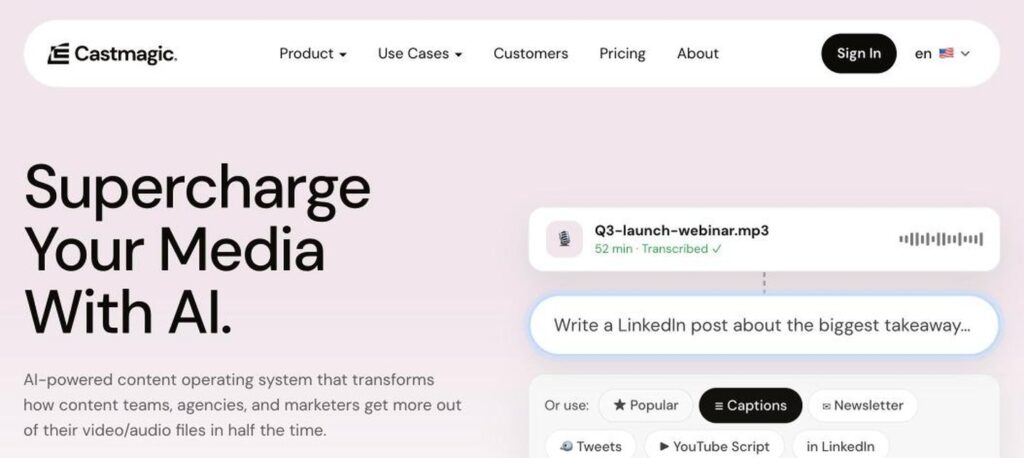
Castmagic is an AI content platform for podcasters, creators and marketing teams. Upload an audio or video file and it transcribes it, then creates show notes, titles, timestamps, quotes, social posts, newsletters and clips from the same recording. Plans start at $19 a month billed yearly.

What is Castmagic?
Castmagic is built around one idea: record once, publish everywhere. It is used by more than 100,000 podcasters and creators to turn long recordings into a full set of marketing content in minutes instead of hours.
After uploading a file or connecting your RSS feed, Zoom or Google Drive, Castmagic produces an accurate transcript in 60+ languages. Its AI then writes show notes, chapter timestamps, keywords, LinkedIn and X posts, blog drafts, YouTube descriptions and newsletters. You can chat with your content library, use custom prompts and create audiograms and media clips.
Castmagic key features
AI transcription
Accurate transcripts in 60+ languages with timestamps.
Show notes
Generate titles, summaries, chapters and keywords.
Social posts
Create LinkedIn, X and Instagram posts from episodes.
Newsletters and blogs
Turn recordings into long-form written content.
Custom prompts
Create your own AI templates and brand voice.
Chat with content
Ask questions across your media library.
Media clips
Clip highlights and create audiograms.
Integrations
Connect Zoom, Google Drive, Zapier and RSS feeds.
Team spaces
Organize content by show or client with team seats.
Castmagic pricing plans (2026)
Castmagic has four plans based on transcription hours. Prices below are per month billed yearly; monthly billing costs more.
Hobby
30 hours, up to 3 spaces, 50GB storage and 3 seats. $239 a year.
Starter
100 hours, 10 spaces, 250GB, 5 seats, API access and onboarding. $579 a year.
Team
400 hours, 25 spaces, 1TB, unlimited seats and priority support. $1,669 a year.
Business & Scale
Enterprise-level hours, custom storage and dedicated support.
All plans include unlimited re-generations, clipping and file uploads. Extra hours can be purchased. Check the latest prices on the official Castmagic pricing page.
How to use Castmagic
- 1
Go to castmagic.io and sign up.
- 2
Upload an audio or video file, or connect your RSS feed.
- 3
Wait for the transcript and AI content to be generated.
- 4
Edit show notes, posts and clips to match your voice.
- 5
Copy, export or share the content to your channels.
Who should use Castmagic?
Podcasters
Create show notes and promo posts fast.
Content marketers
Repurpose webinars into blogs and posts.
Agencies
Produce content for many clients.
Coaches and creators
Turn calls into newsletters and courses.
Pros and cons
What we like
- Huge time saver for repurposing
- Many content formats from one file
- Custom prompts for your brand voice
- Unlimited re-generations
Watch out for
- No free plan
- Hours limit heavy users
- Monthly prices are higher
- AI content still needs editing
Best Castmagic alternatives
Castmagic is one of the best AI tools for turning podcasts and videos into ready-to-publish content. It saves hours of writing every week, and custom prompts help keep your voice. The Hobby plan is a good start for solo podcasters.
Castmagic FAQs
Is Castmagic free?
Castmagic does not list a free plan on its pricing page; paid plans start at $19 a month billed yearly.
How much does Castmagic cost?
Hobby costs $19, Starter $48 and Team $139 a month billed yearly. Business plans start at $699 a month.
What does Castmagic create?
It creates transcripts, show notes, timestamps, social posts, newsletters, blogs and clips.
How many languages does Castmagic support?
Castmagic supports transcription in 60+ languages.
Does Castmagic integrate with Zoom?
Yes. It integrates with Zoom, Google Drive, Zapier and RSS feeds.
Does Castmagic have an API?
Yes. API access is included on Starter and higher plans.