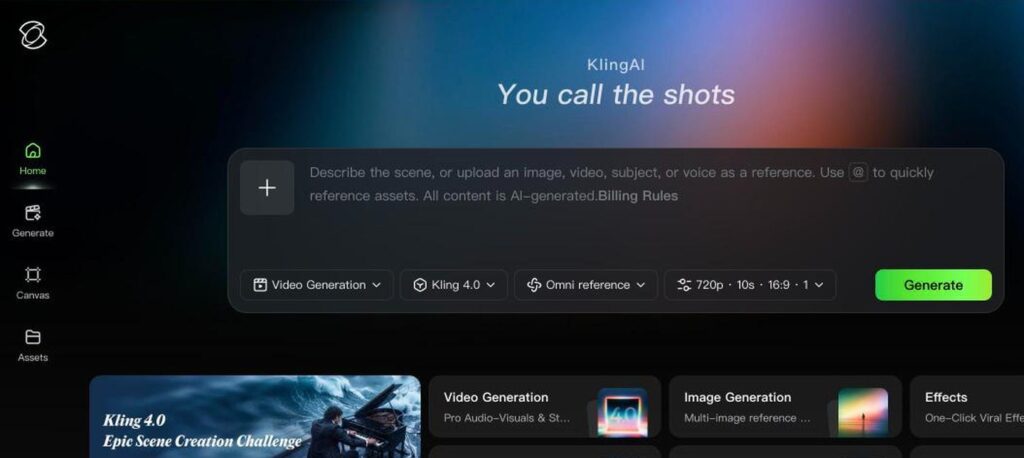
Kling AI is a popular AI video generator from Kuaishou. It turns text prompts and images into realistic video clips with smooth motion, and it also creates images, avatars and effects. Free users get daily credits, and paid plans start at $10 a month.

What is Kling AI?
Kling AI is known for realistic motion and cinematic quality, which made it one of the most searched AI video tools. You can describe a scene, upload an image or use references, and Kling creates a video clip in minutes.
Beyond text and image to video, Kling offers motion control, talking avatars, image generation, effects and a canvas for editing. Paid plans remove watermarks, allow commercial use and give faster generation.
Kling AI key features
Text to video
Create video clips from written prompts.
Image to video
Animate a still image into a realistic clip.
Omni reference
Use images, videos and subjects as references.
Motion control
Guide character movement and camera motion.
Avatars
Create realistic talking avatar videos.
Image generation
Generate images with Kling image models.
Video extension
Extend clips to make longer videos.
Effects
One-click viral video effects.
API
Use Kling models in your own apps.
Kling AI pricing plans (2026)
Kling AI uses credits. Free users get daily credits, and paid plans give monthly credits with faster, watermark-free generation.
Free
Daily free credits, lower resolution and watermarked videos.
Standard
660 credits a month, no watermark and commercial use.
Pro
3,000 credits a month, priority processing and batch generation.
Premier
18,000 credits a month for high-volume creators.
Prices checked in October 2026 (USD, monthly billing). Yearly billing and first-month offers can lower the price. Credits do not roll over. Confirm on the official Kling AI plans page.
How to use Kling AI
- 1
Go to app.klingai.com/global and sign up for free.
- 2
Choose Video Generation and pick a Kling model.
- 3
Type your prompt or upload an image or reference.
- 4
Set the resolution, length and aspect ratio, then click Generate.
- 5
Download your video or extend and edit it.
Who should use Kling AI?
Content creators
Make eye-catching clips for social media.
Filmmakers
Create shots, previews and concepts.
Marketers
Produce product and ad videos quickly.
Hobbyists
Bring photos and ideas to life.
Pros and cons
What we like
- Realistic motion and quality
- Free daily credits
- Many creative tools in one app
- Affordable entry plan
Watch out for
- Free videos have watermarks
- Credits run out quickly at high quality
- Generation can be slow on free plans
- Pricing and offers change often
Best Kling AI alternatives
Kling AI is one of the best AI video generators for realistic motion. Use the free daily credits to test it, then choose Standard or Pro for watermark-free and commercial videos.
Kling AI FAQs
Is Kling AI free?
Yes. Kling AI gives free daily credits, but free videos have a watermark and lower resolution.
How much does Kling AI cost?
Standard costs $10/month, Pro $37/month and Premier $207/month on monthly billing. Yearly plans are cheaper.
Who makes Kling AI?
Kling AI is made by Kuaishou Technology, a Chinese short-video company.
Can I use Kling AI videos commercially?
Yes, on paid plans. Free plan videos are not for commercial use.
Does Kling AI have an app?
Yes. Kling AI is available on the web and on mobile.
What is the best Kling AI alternative?
Runway, Google Veo and HeyGen are popular alternatives.